

Field Service Management
You bought this module and need support? Click here
Field Service Management
Every complaint,tracked to done.
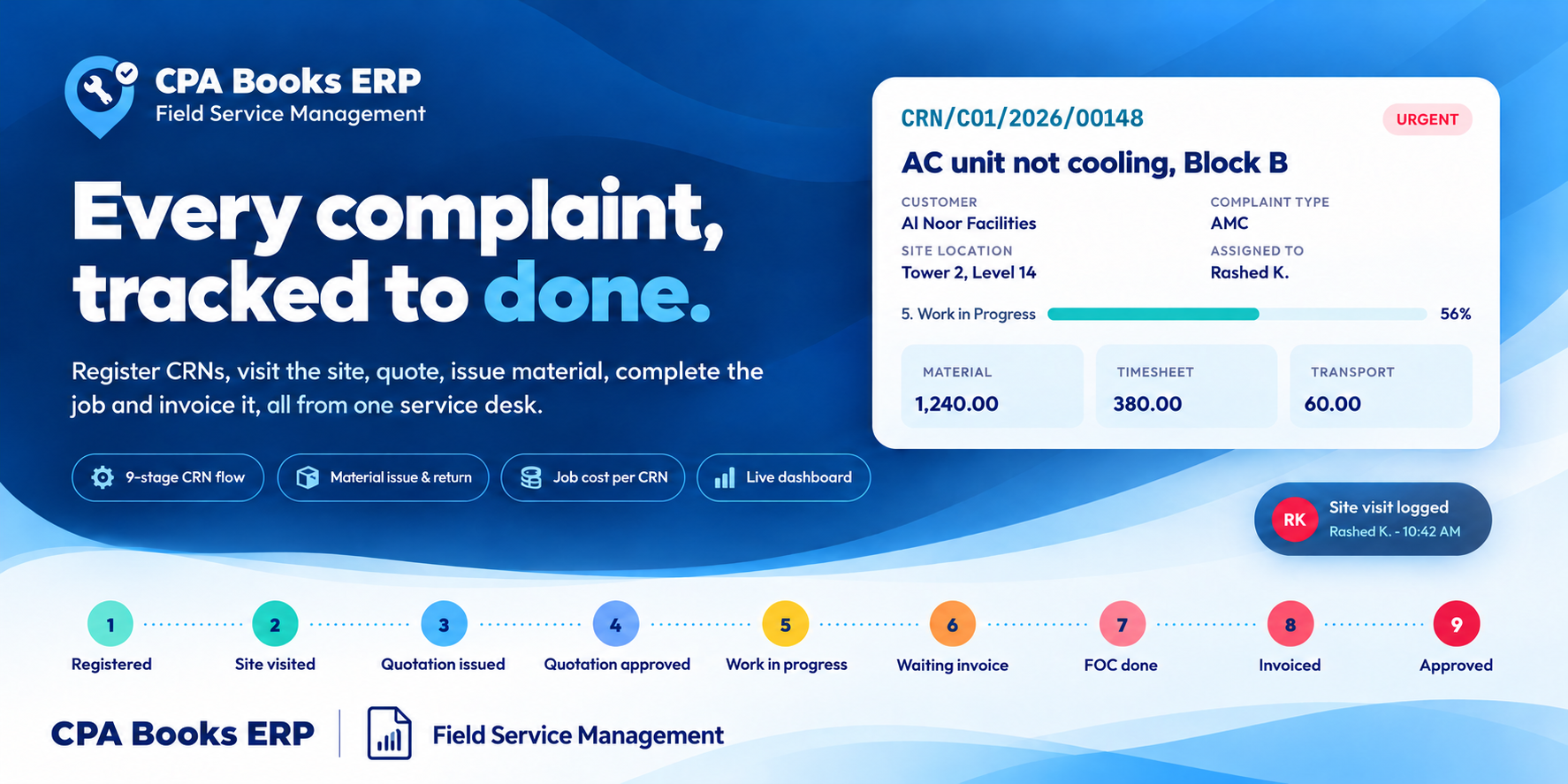
Field Service Management turns project tasks into Complaint Registration Numbers (CRNs). Register the call, visit the site, quote, issue material, finish the job, invoice it and close it, all on one guided form.
Built for facility management, MEP, HVAC and maintenance companies that run AMC and call-out service jobs.
Follow the 9 stages Ask for a demo
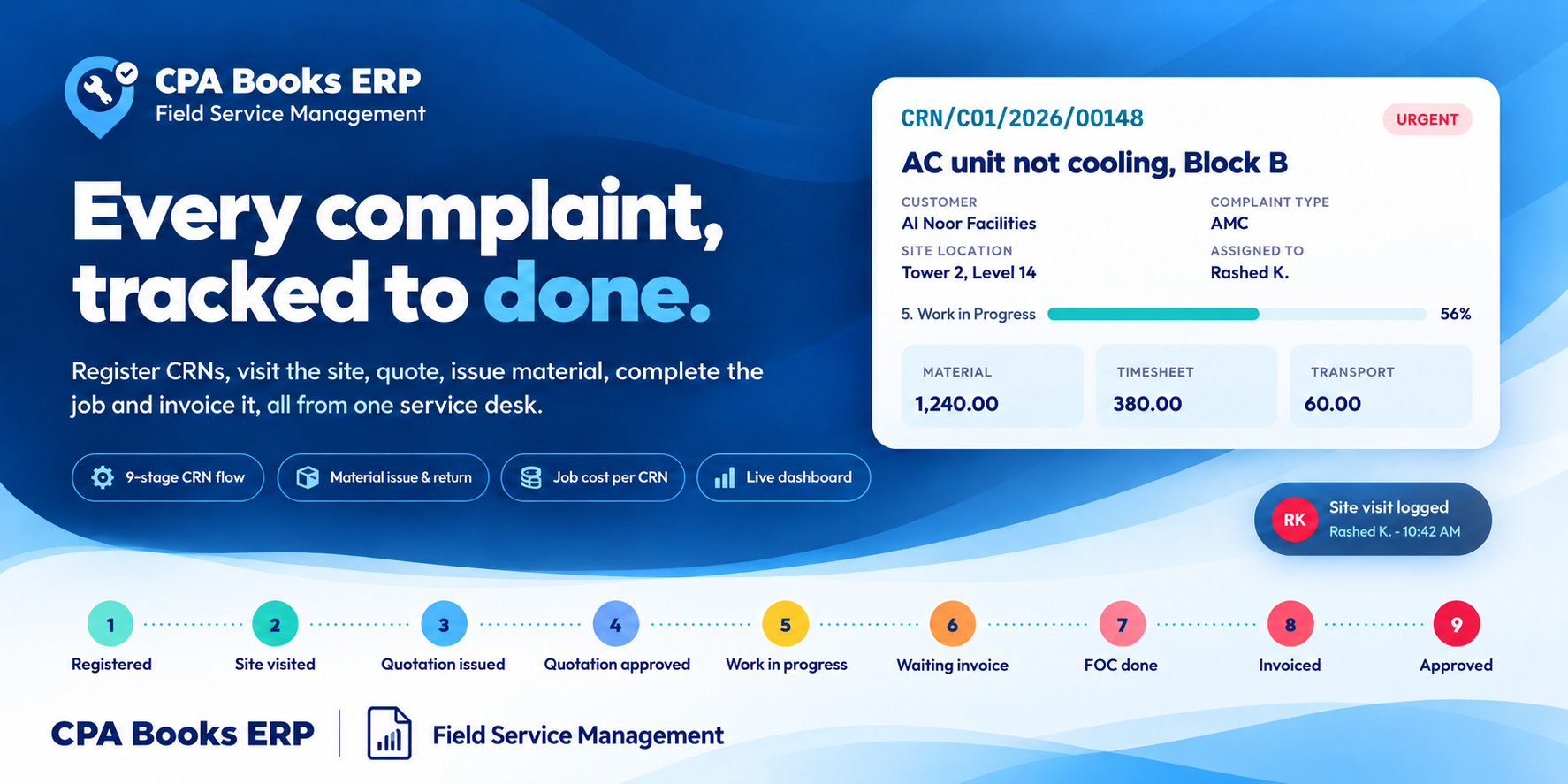
Nine stops from the first call to approval
The stage moves on by itself as the site visit is logged, the quotation is sent and confirmed, the work dates are filled and the invoice is posted.
One service desk, opened in one click
The Complaint Registration app opens on the Complaint Registration Management dashboard, with a sidebar for CRNs, reporting, store and timesheets.
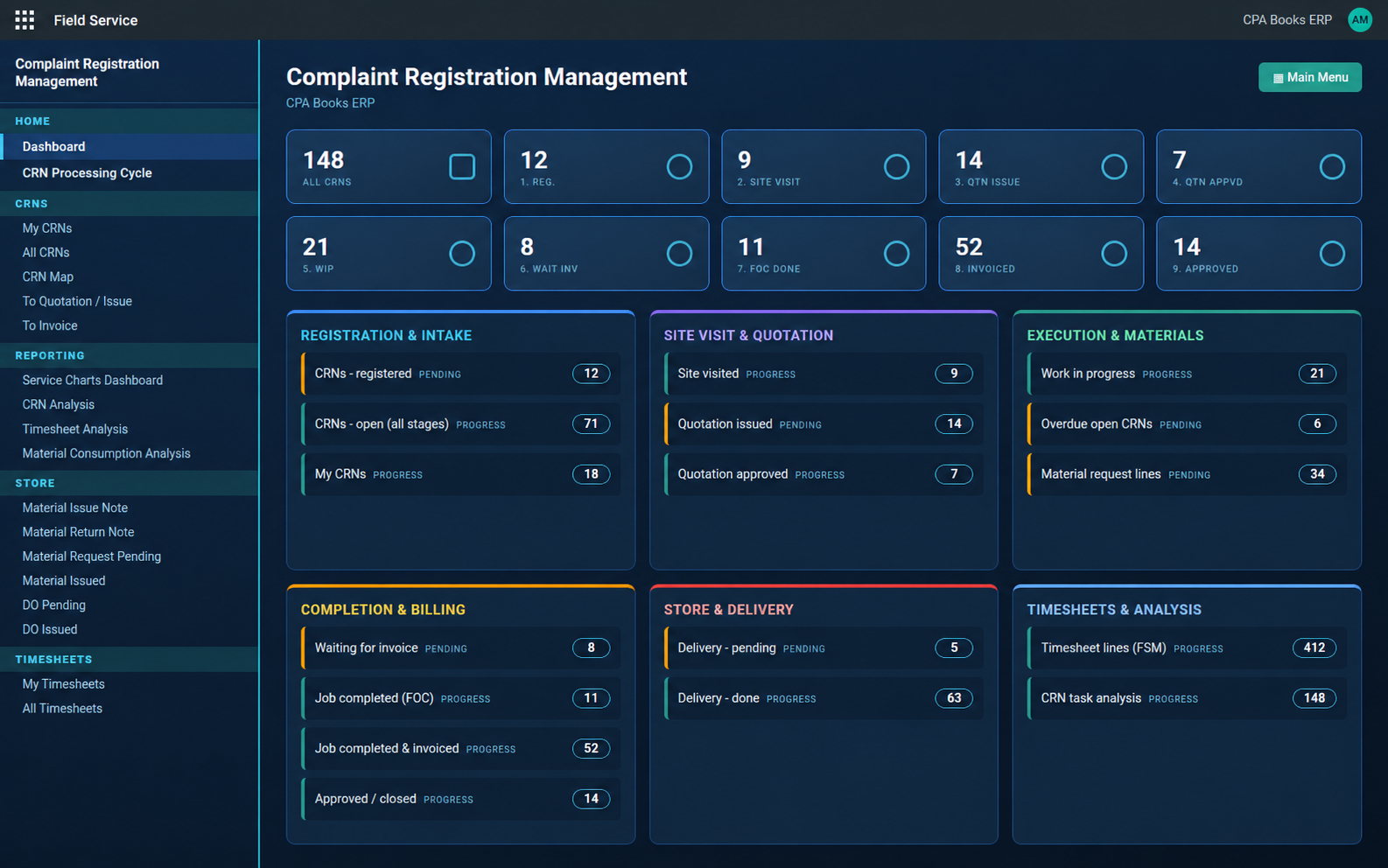
Dashboard. A count for every stage, plus panels for intake, quotation, execution, billing, store and timesheets. Click any number to open that list.
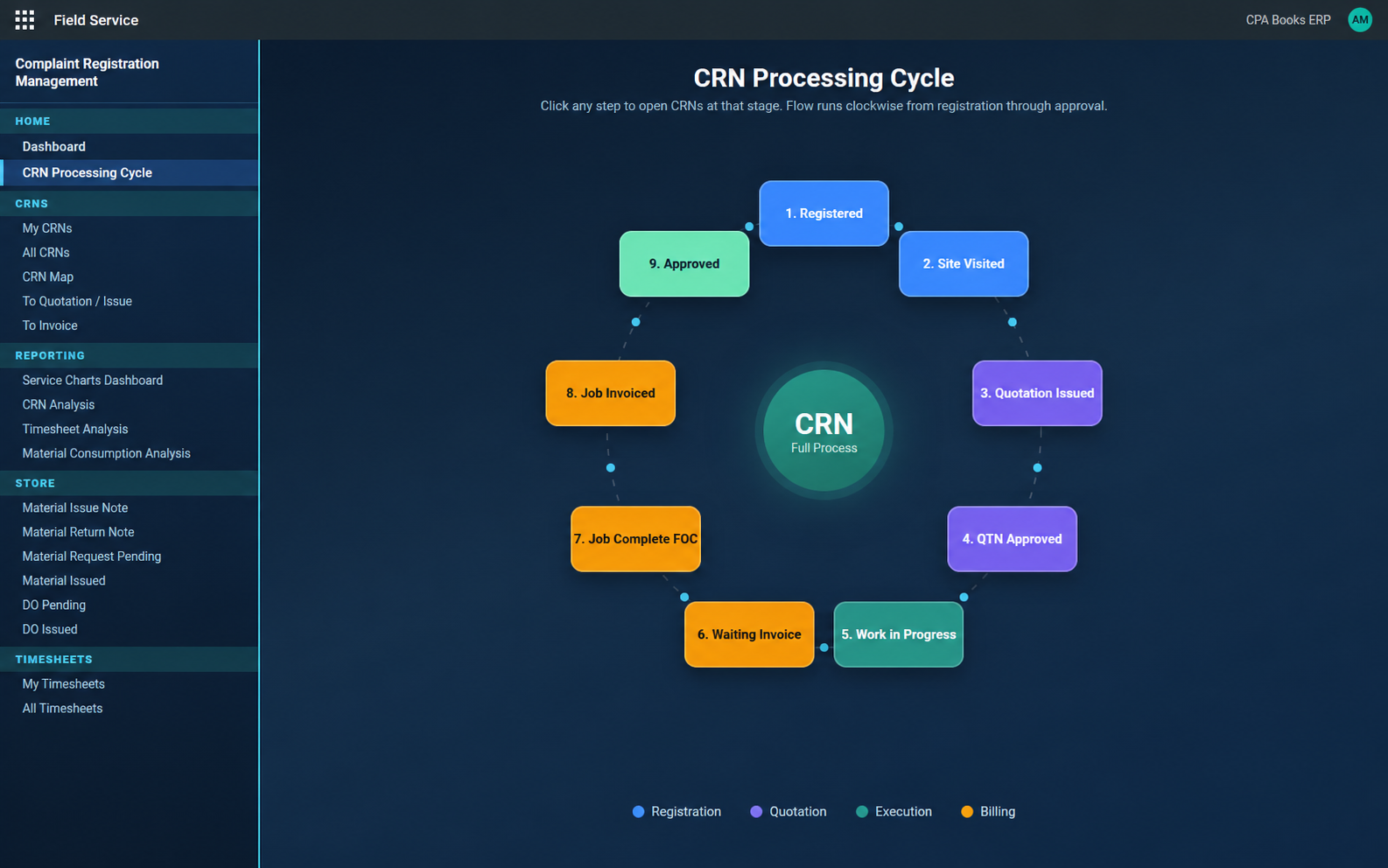
CRN Processing Cycle. The nine stages on a clockwise ring, coloured by phase. Click a stage to open its CRNs.
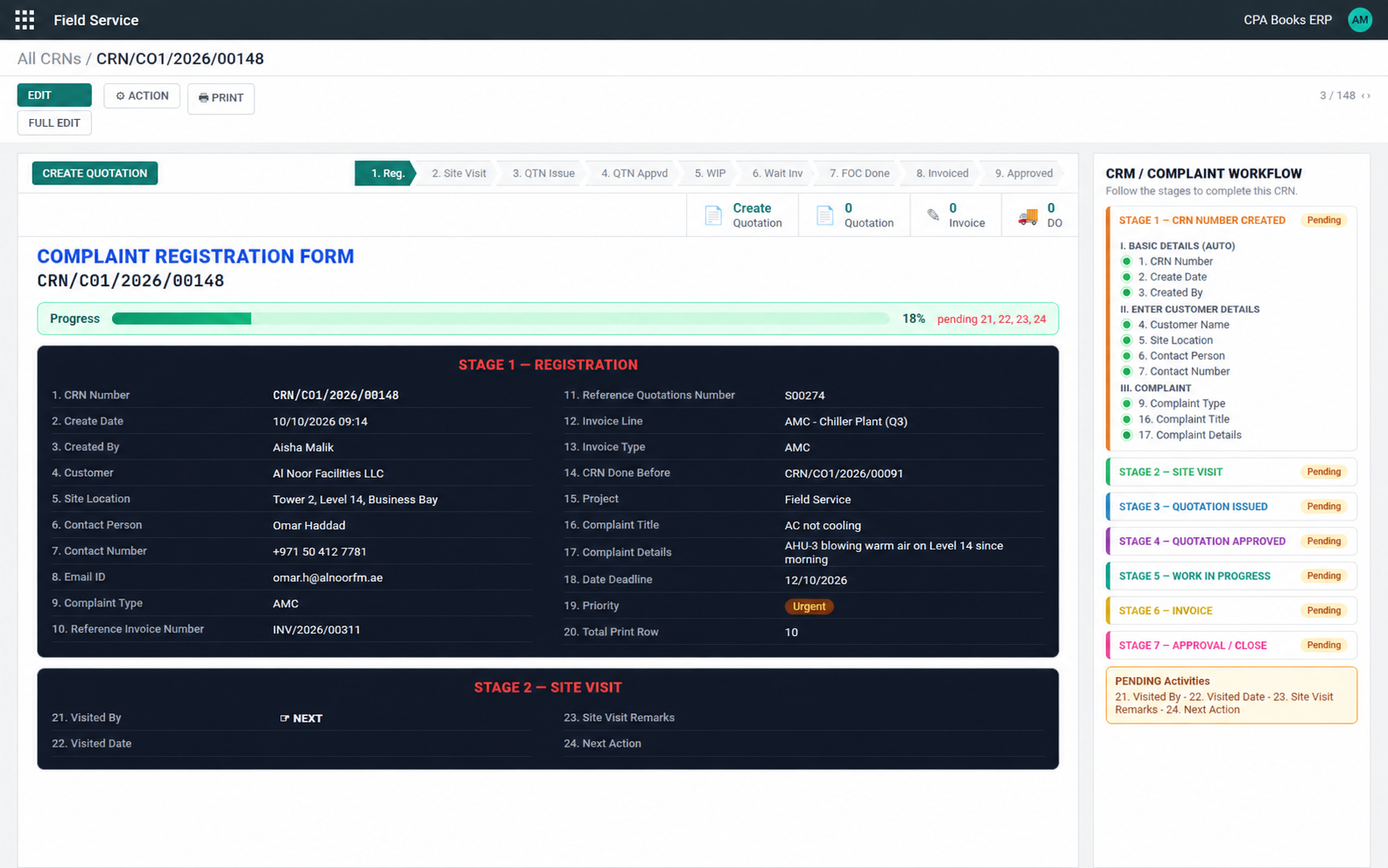
A form that tells you what comes next
After the site visit, pick the next action
Field 24 decides where the CRN goes.
1. Closed 2. Issue QT 3. FOC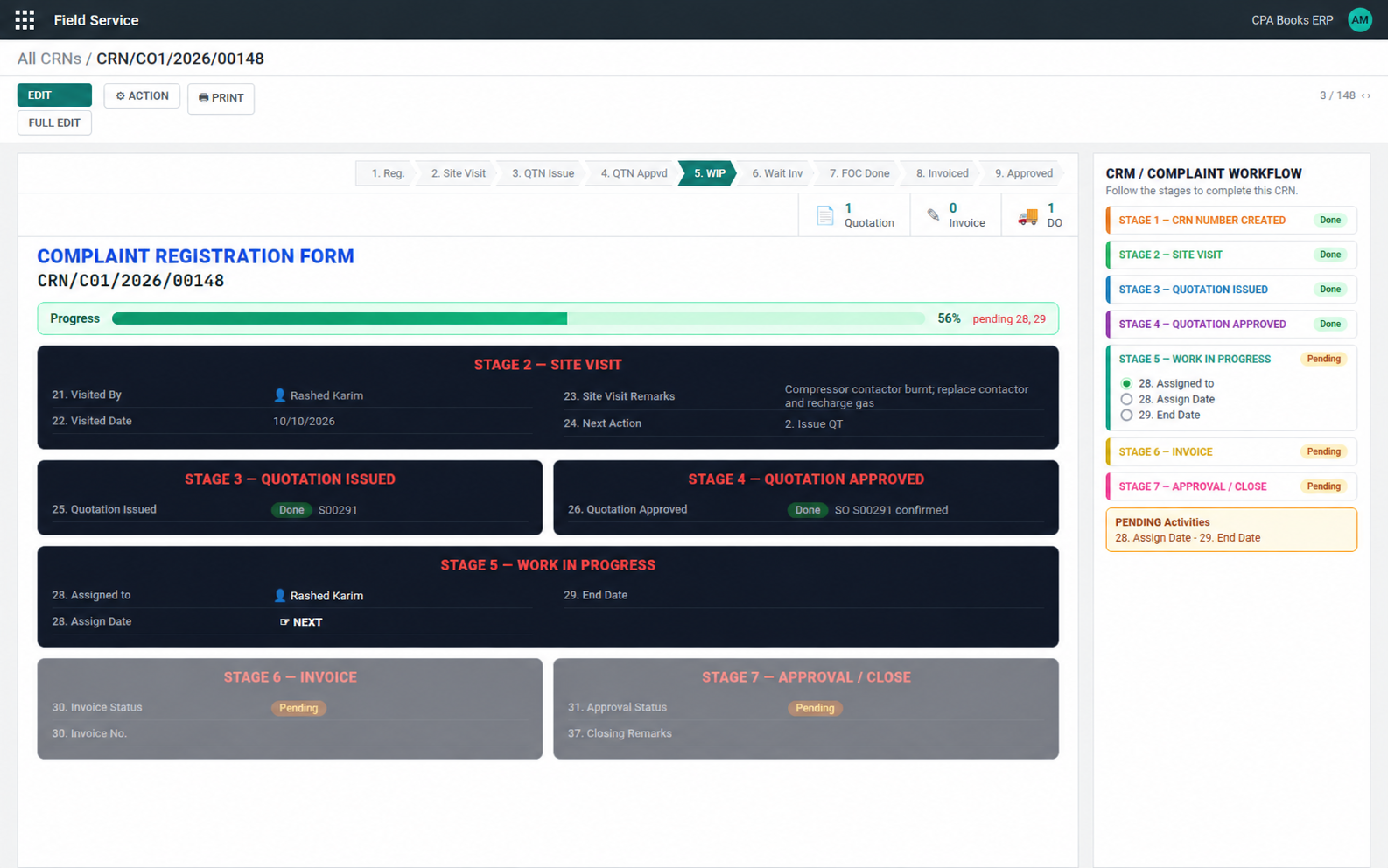
The Quotation, Invoice and DO buttons on top of the form open the documents linked to the CRN.
Know what each CRN really cost
Material + Timesheet (In / Out × rate) + Transport + Other = Total Actual + Estimated Cost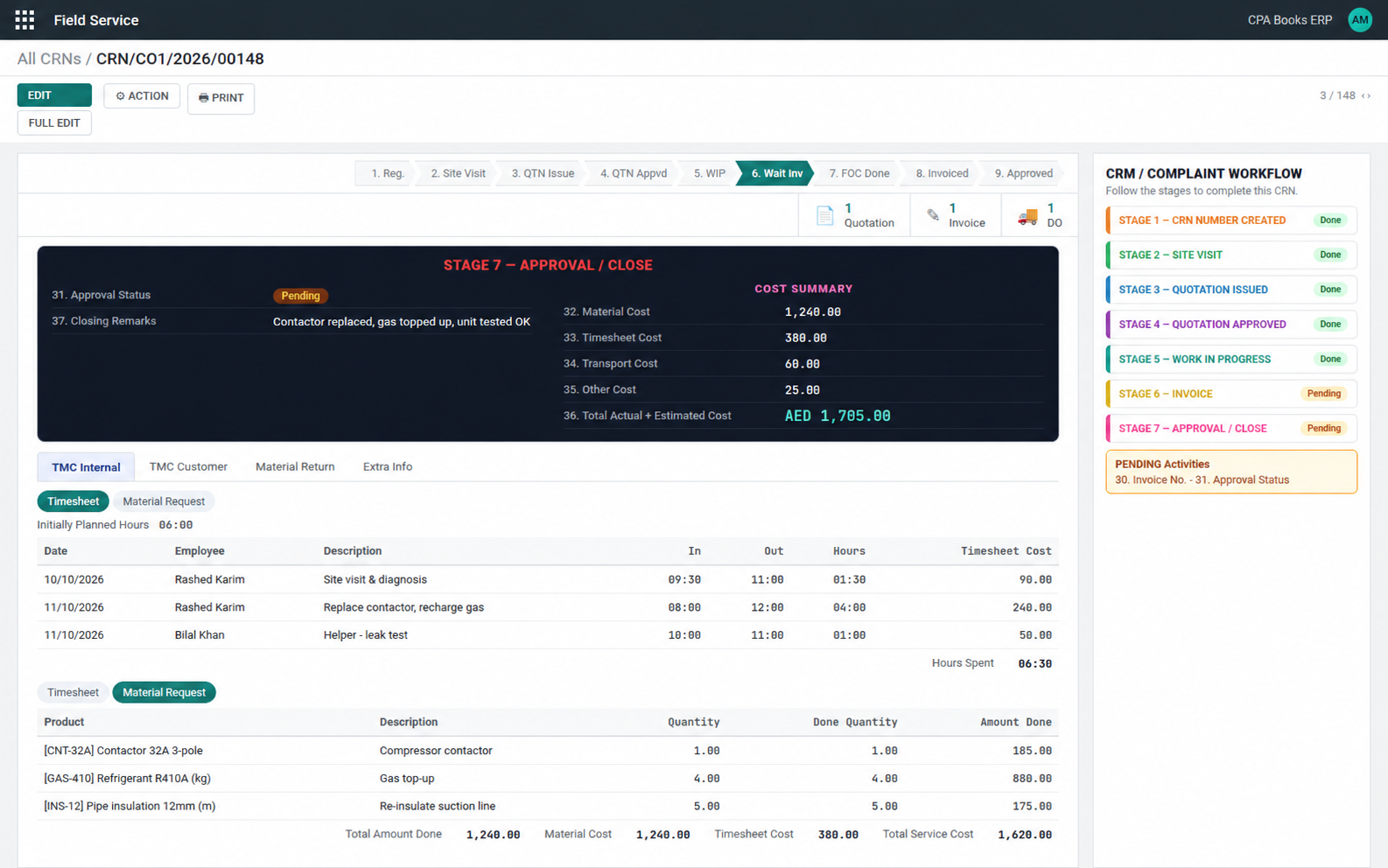
Material issued and returned against the CRN
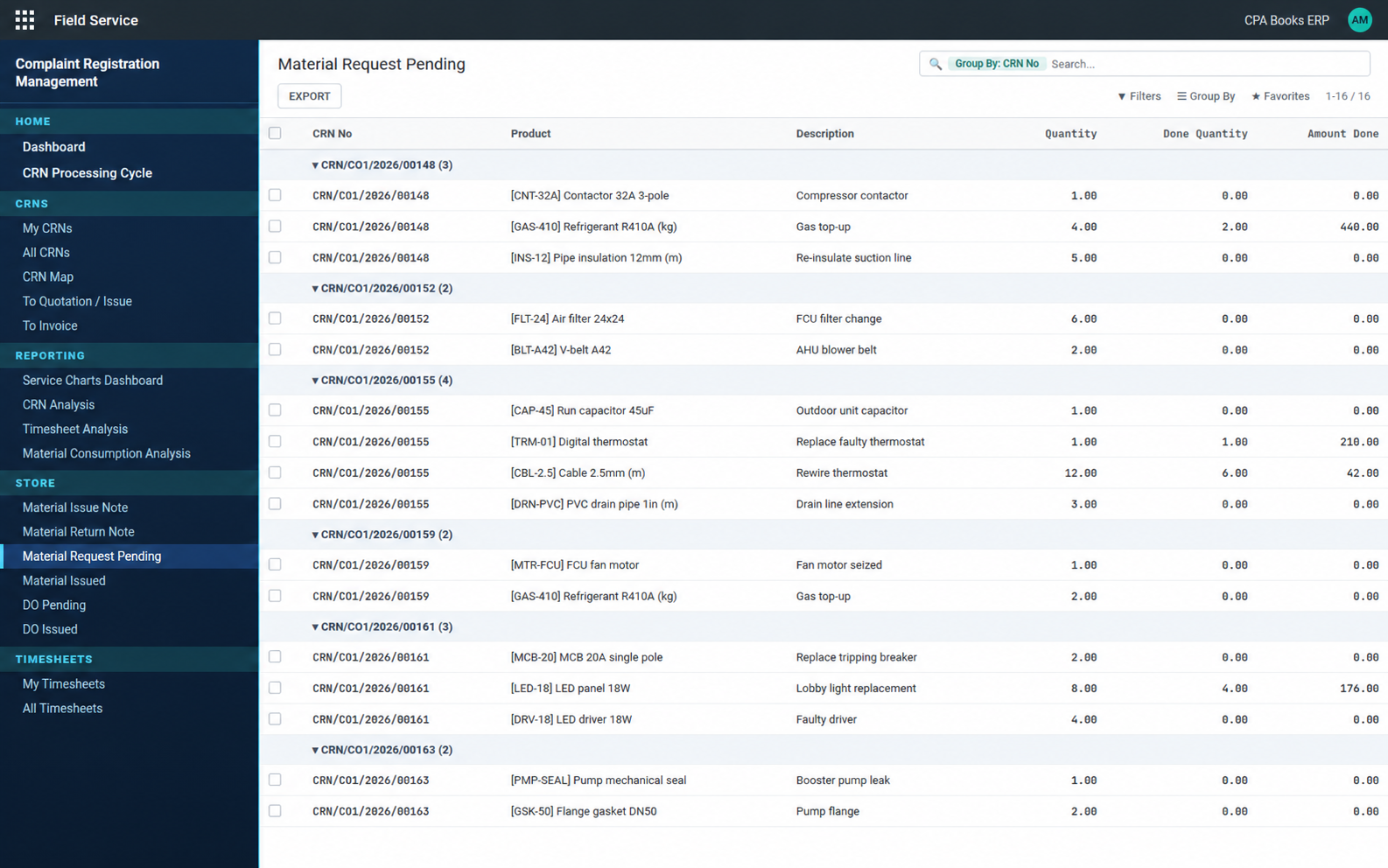
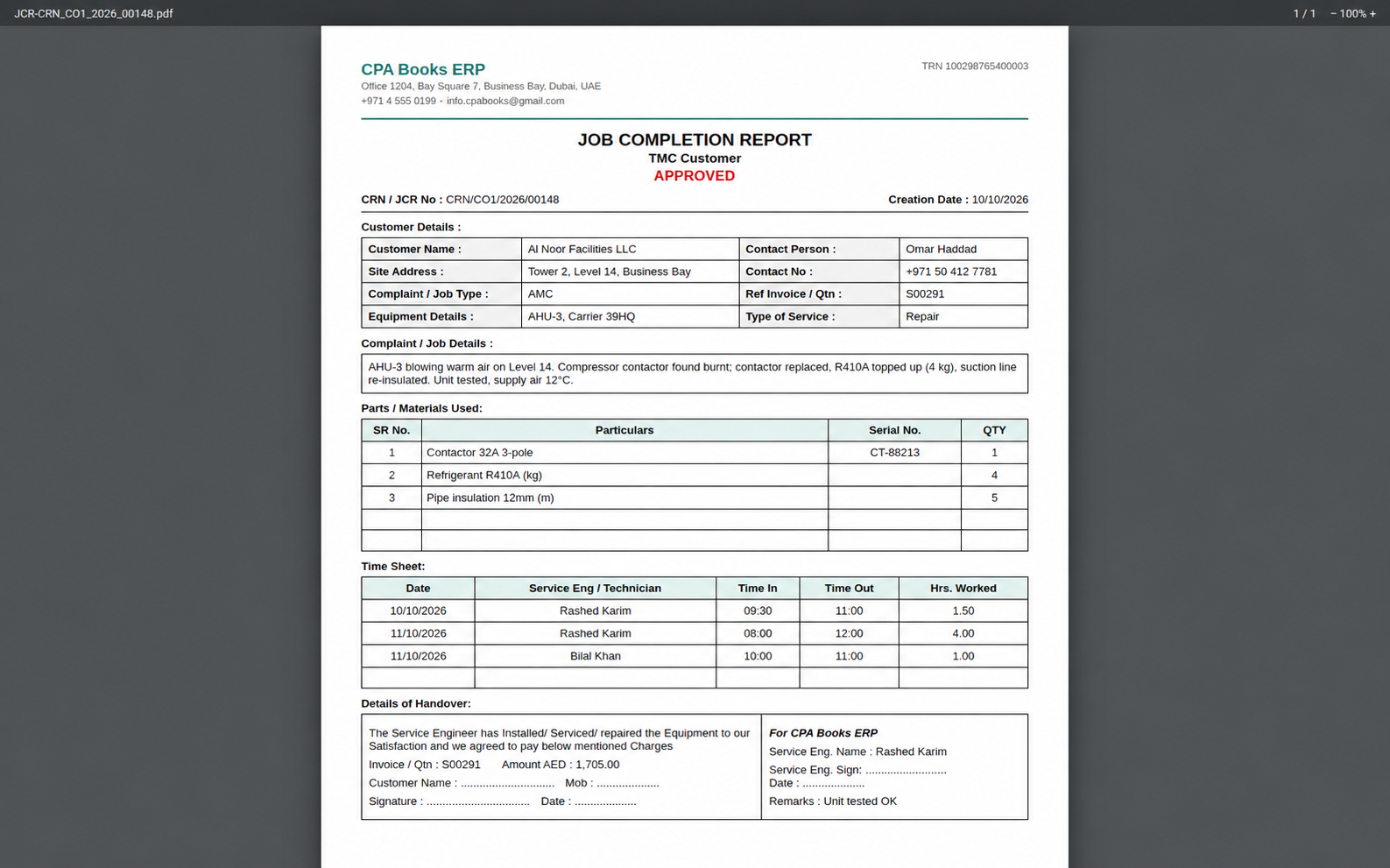
Job Completion Report, in two copies
| TMC Internal | Your own record of parts and engineer hours. |
| TMC Customer | The copy the customer signs at handover. |
Customer details, complaint and job details, parts used with serial numbers, the time sheet, and a handover block with signatures for the customer and your company. The number of table rows is set per CRN.
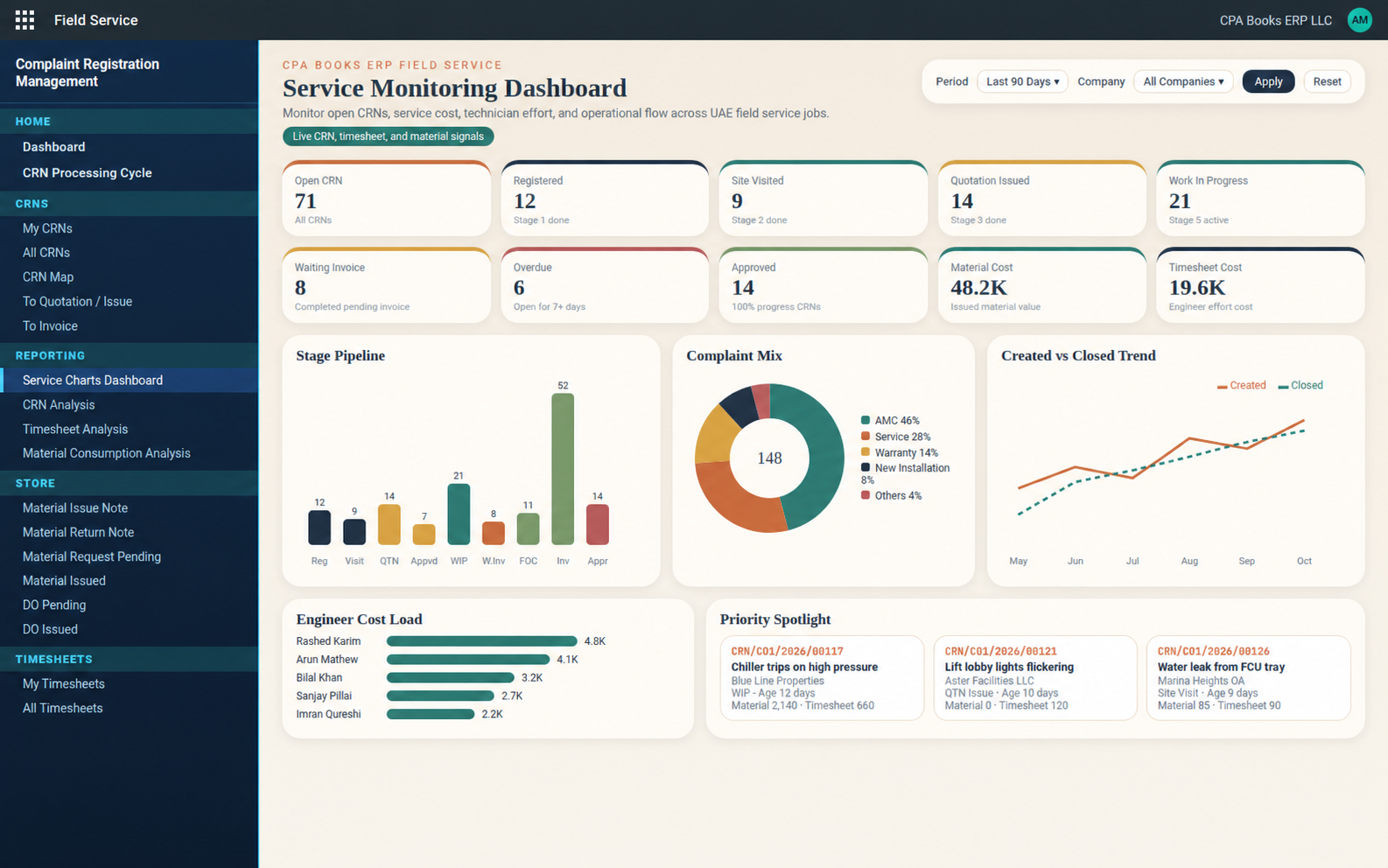
Service Monitoring Dashboard
Stage pipeline, complaint mix, created vs closed trend, engineer cost load and the oldest open CRNs, filtered by period and company.
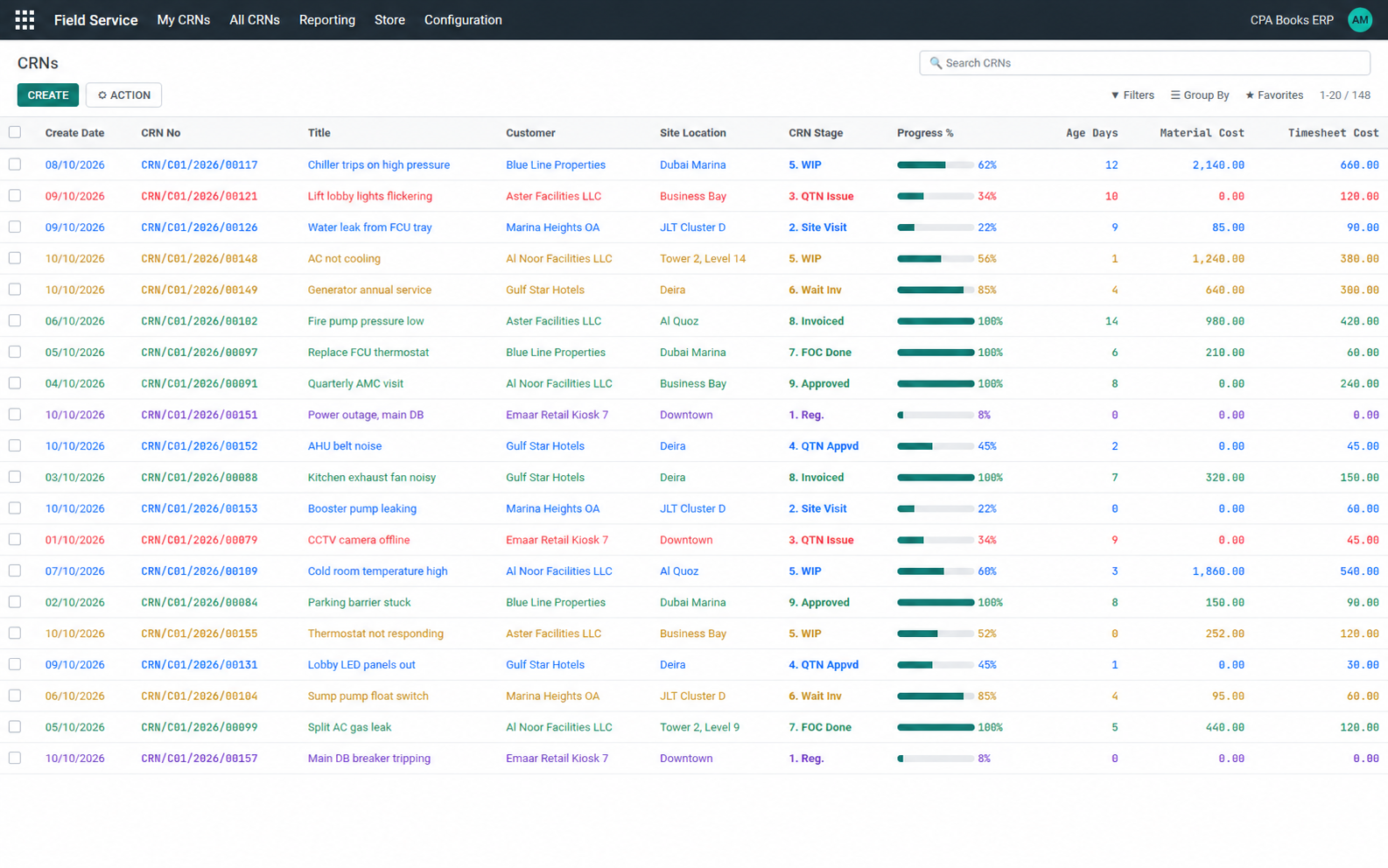
A CRN list you can read by colour
Progress %, age in days, material and timesheet cost on every row.
Requirements
| Odoo | 14.0 Community and Enterprise |
| Required apps | Project, Timesheets, Sales Timesheet, Sales Stock, Inventory, Purchase |
| Other modules | None. No third-party apps needed. |
Good to know
FAQ
Upgradeable to any Odoo version
Available for Odoo 14 right now. On a newer Odoo? We move Field Service Management to your version. Contact us on WhatsApp or email.
Want a walkthrough on your data?
Write to us and we will set up a demo or help you install it.
info.cpabooks@gmail.com WhatsApp +971 56 256 8128# -*- coding: utf-8 -*-
{
'name': 'Field Service Management',
'summary': """
Field service complaint registration (CRN): 9-stage workflow from
registration, site visit and quotation to job completion, invoice and
approval, with material issue/return notes, job costing and dashboards.
Works on Odoo Community and Enterprise.""",
'description': """
Field Service Management turns project tasks into Complaint
Registration Numbers (CRNs). Every complaint follows a guided 9-stage
flow (Registered, Site Visited, Quotation Issued, Quotation Approved,
Work in Progress, Waiting Invoice, FOC Done, Invoiced, Approved) with a
numbered form, a stage checklist and a progress bar.
Store teams issue and return materials against a CRN with Material
Issue / Return Notes, and every CRN collects material, timesheet,
transport and other costs. A service dashboard, a processing cycle
view, chart dashboards and Job Completion Reports (internal and
customer copies) are included.
""",
'author': 'CPA Books ERP',
'website': 'https://cpabookserp.com',
'live_test_url': 'https://cpabookserp.com/contactus',
'support': "info.cpabooks@gmail.com",
'category': 'Services/Field Service Management',
'version': '14.0.1.2.0',
'license': 'OPL-1',
'images': ['static/description/banner.png'],
'depends': [
'base',
'project',
'hr_timesheet',
'sale_timesheet',
'sale_stock',
'stock',
'purchase',
],
'data': [
'security/crn_security.xml',
'security/ir.model.access.csv',
'security/customer_part_access.xml',
'data/invoice_type_data.xml',
'data/project_project_data.xml',
'data/project_task_data.xml',
'views/crn_base_views.xml',
'views/report_project_task.xml',
'reports/worksheet_customer_report_templates.xml',
'views/complaint_detail_views.xml',
'views/project_project_views_inherit.xml',
'views/project_task_views.xml',
'views/crn_task_bifurcation_views.xml',
'views/fsm_task_form_statusbar_fix_views.xml',
'views/fsm_task_form_next_action_duplicate_fix.xml',
'views/fsm_action_navigation_views.xml',
'views/fsm_crn_form_shell_views.xml',
'views/fsm_workflow_ui_views.xml',
'views/fsm_workflow_stage_controls_views.xml',
'views/fsm_timesheet_employee_views.xml',
'views/fsm_crn_cost_views.xml',
'views/fsm_crn_create_views.xml',
'views/res_partner_views.xml',
'views/account_move_views.xml',
'views/customer_parts_views.xml',
'views/stock_issue_note_views.xml',
'views/issue_note_views.xml',
'views/stock_picking_delivery_views.xml',
'views/material_return_views.xml',
'views/timesheet_cost_views.xml',
'views/fsm_task_cancel_actions.xml',
'views/fsm_project_task.xml',
'views/crn_service_assets.xml',
'views/crn_service_menus.xml',
'views/fsm_dashboard_views.xml',
'views/fsm_material_consumption_views.xml',
'views/fsm_store_views.xml',
'views/fsm_store_inventory_menus.xml',
'views/fsm_test_data_wizard_views.xml',
'wizard/fsm_stage0_close_wizard_views.xml',
'views/fsm_crn_ui_cleanup_views.xml',
'views/sale_order_views.xml',
],
'pre_init_hook': 'pre_init_hook',
'post_init_hook': 'post_init_hook',
'qweb': [
'static/src/xml/crn_service_dashboard.xml',
'static/src/xml/crn_processing_cycle.xml',
],
'demo': [
'demo/demo.xml',
],
'application': True,
'installable': True,
}
Copyright (c) 2026 Saaskul (https://saaskul.com)

Odoo Proprietary License v1.0

This software and associated files (the "Software") may only be used (executed,
modified, executed after modifications) if you have purchased a valid license
from the authors, typically via Odoo Apps, or if you have received a written
agreement from the authors of the Software (see the COPYRIGHT file).

You may develop Odoo modules that use the Software as a library (typically
by depending on it, importing it and using its resources), but without copying
any source code or material from the Software. You may distribute those
modules under the license of your choice, provided that this license is
compatible with the terms of the Odoo Proprietary License (For example:
LGPL, MIT, or proprietary licenses similar to this one).

It is forbidden to publish, distribute, sublicense, or sell copies of the Software
or modified copies of the Software.

The above copyright notice and this permission notice must be included in all
copies or substantial portions of the Software.

THE SOFTWARE IS PROVIDED "AS IS", WITHOUT WARRANTY OF ANY KIND, EXPRESS OR
IMPLIED, INCLUDING BUT NOT LIMITED TO THE WARRANTIES OF MERCHANTABILITY,
FITNESS FOR A PARTICULAR PURPOSE AND NONINFRINGEMENT. IN NO EVENT SHALL THE
AUTHORS OR COPYRIGHT HOLDERS BE LIABLE FOR ANY CLAIM, DAMAGES OR OTHER
LIABILITY, WHETHER IN AN ACTION OF CONTRACT, TORT OR OTHERWISE, ARISING FROM,
OUT OF OR IN CONNECTION WITH THE SOFTWARE OR THE USE OR OTHER DEALINGS IN THE
SOFTWARE.